What Odds Outliers shows you
Bet the same player prop at four bookmakers and you will often get four different sets of odds. One might have Bukayo Saka at 1.30 to have a shot on target while another has him at 1.44, for the exact same bet in the exact same match. Books trade on their own numbers, so those gaps open up all the time.
Odds Outliers pulls the live odds from every supported bookmaker, works out the average, and flags where one book sits furthest from that average. That gap is the edge. In the Saka example, the 1.44 book is paying well over the rest, an edge of about +9%, and that is exactly the kind of row this tool puts in front of you.
It covers ten markets across the leagues we track, refreshes the odds every minute, and compares up to 5 bookmakers on every prop. There is no prediction or model in it. It only compares one book against the others, so it is a pure odds-comparison tool.
How to read the edges table
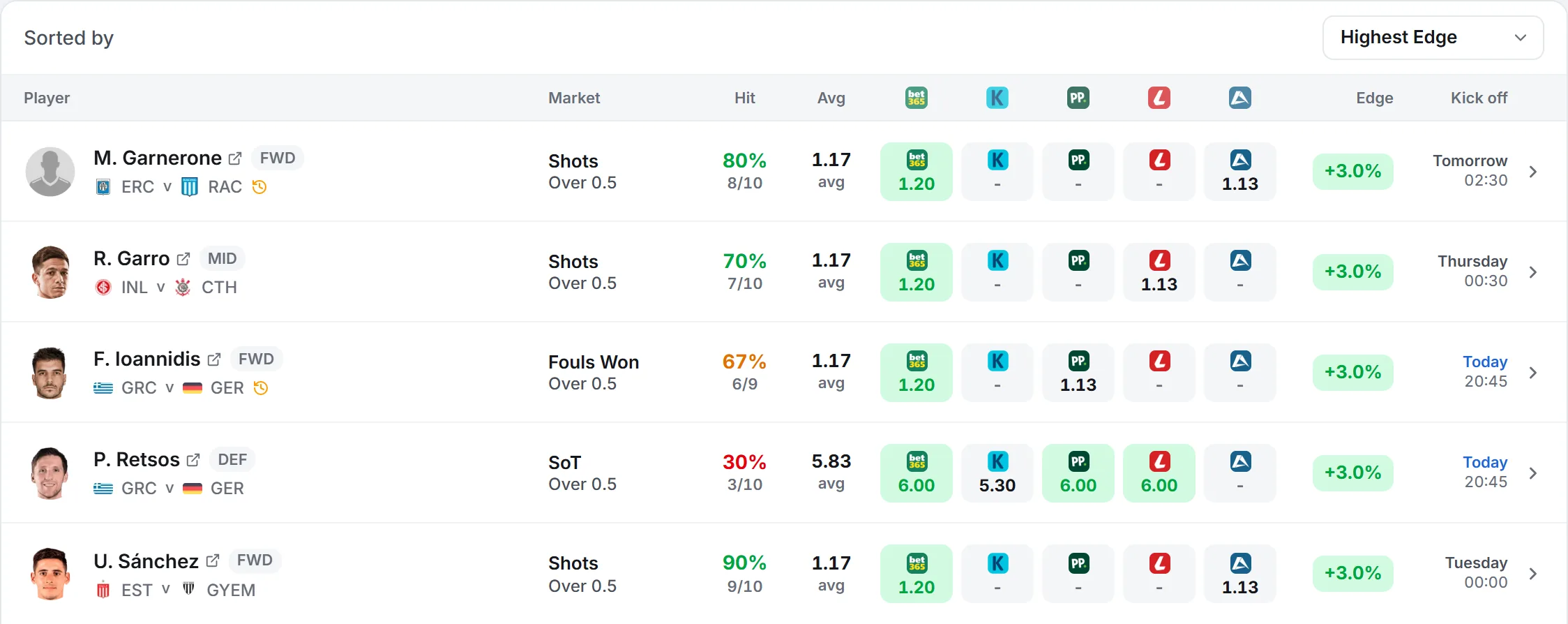
Every result is a row in a table. Reading left to right, here is what each column tells you.
- Player.
- Photo, name and position. Tap the name for the full player page. A small history icon can appear here as a warning: red means the player has not featured lately, amber means they are in the squad but not starting.
- Fixture.
- The two teams and the kickoff time. Tap it to open the match page.
- Market.
- The stat and the line, like SoT Over 0.5 (1 or more shots on target) or Shots Under 2.5.
- Hit %.
- A ring showing how often the player has cleared this exact line in their last 10 starts, with the count below it, like 9/10. Green is strong, amber is middling, red is weak.
- Avg.
- The average odds across the books you have chosen. This is the number every edge is measured against.
- The bookmaker columns.
- One column per book, showing that book's odds for the bet. The best odds are green, the worst are red, and under each is how far they sit from the average, as a percentage. A dash means that book has not set odds for the prop.
- Edge.
- The headline number, and the reason the row is here. It is the best book's gap over the average. +9.1% means the top odds are 9.1% above the market.
- The stats button.
- The small chart icon on the right opens a panel with the full odds breakdown and the player's recent games for that stat, covered further down.
Filtering to the edges you want
On a computer the filters sit in panels down the left of the board. On a phone the same filters open in one drawer from the Filters button. Every filter stacks, so you can narrow a whole board down to a handful of bets.
The filter panels
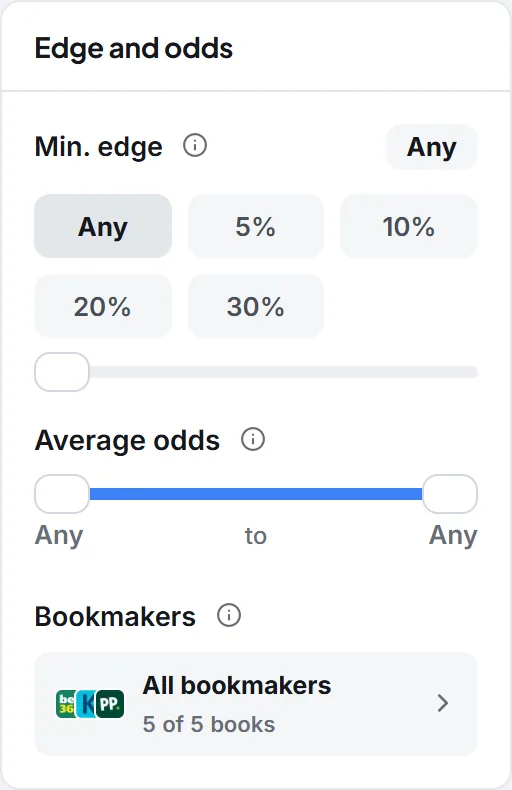
- Min. edge.
- Any, 5%, 10%, 20% or 30%, or drag the slider. The fastest way to jump straight to the bigger gaps and skip the noise.
- Markets and lines.
- Pick the markets you bet on, keep only certain lines, and choose over, under or both.
- Player criteria.
- Keep only forwards, midfielders, defenders or goalkeepers, and set a minimum hit rate.
- Sort.
- Order the board by highest or lowest edge, highest or lowest hit rate, highest or lowest average odds, or soonest and latest kickoff.
The filters drawer on a phone
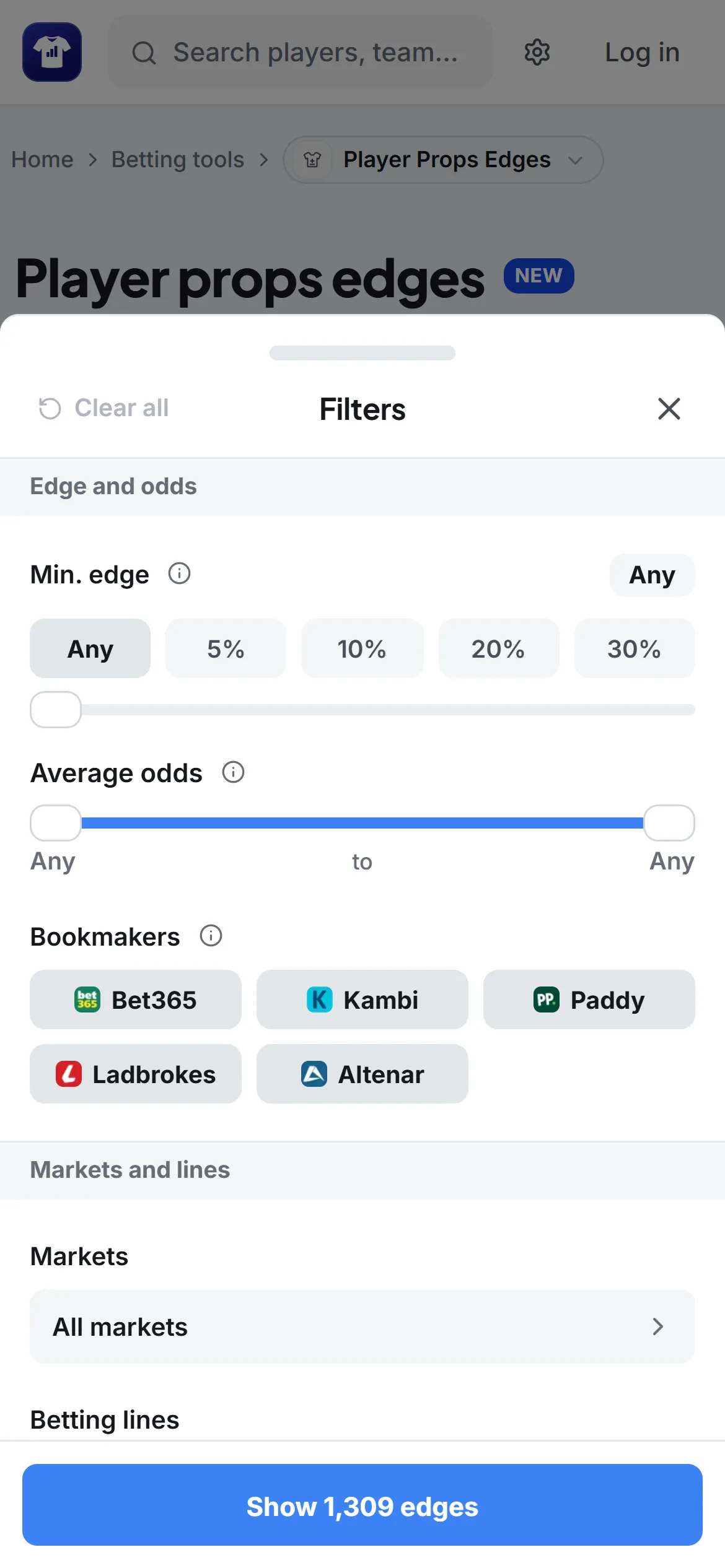
- Date range.
- All, Today, Next 24h, Next 3 days, Next 7 days, or Custom to tap exact days up to two weeks out.
- Bookmakers.
- Choose which books to compare, with a minimum of two. This one matters: the average odds and every edge recompute from only the books you pick, so dropping a book changes the numbers.
- Selection.
- Both, Over or Under. Switch to Under to hunt props where the odds have a player staying below the line.
- Lines.
- Keep only certain lines from 0.5 to 9.5 across every market, for example only the 0.5 lines.
- Edge range.
- A minimum and a maximum. Set the minimum to 3 to hide the tiny gaps and only see meaningful ones.
- Average odds range.
- A minimum and maximum for the odds, so you can skip odds-on favorites or cap how long the odds you are willing to take can be.
- Minimum hit rate.
- A slider. Keep only props where the player has cleared this line in at least this share of their last 10 starts. Players with fewer than five starts in the last year drop out when it is on.
- Exclude inactive players and Exclude non-starters.
- Two switches that hide players with no minutes, or no start, in any of their team's last 3 matches, so you are not looking at edges you cannot really bet.
The combination that surfaces the best bets is simple: a real edge and a high hit rate at the same time. A big odds gap on a player who actually clears the line often is the strongest thing this tool can show you.
Checking a prop before you back it
A big green edge is a reason to look, not a reason to bet. Before you place anything, run three quick checks.
- 1
Is the player actually good at this?
Read the hit rate ring. A +10% edge on a player who clears the line 3 times in 10 is noise. You want a strong ring and a healthy sample behind it. - 2
Open the stats panel.
The chart button on any row opens the full odds breakdown, every book marked best or worst, next to the player's recent games for that stat. It is the quickest way to see the form behind the number before you commit. - 3
Watch for a promo behind the odds.
Some books legitimately set shorter odds on a prop because they pay out if your starter is subbed off and the replacement does it. If the book with the longer odds is the one without that feature, the gap can be fair rather than a mistake. Glance at it before you commit. - 4
Will they start?
A red or amber icon by the name means the player may be on the bench. No edge matters if they do not play, so lean on the exclude switches near kickoff.
Example: a 5% shots on target edge
Say you want a shots on target bet where a bookmaker is paying over the odds and the player is a reliable shooter. Here is the search, step by step.
- 1In the quick bar, leave shots on target on and switch the other markets off.
- 2Tap the 5%+ edge button to hide the small gaps.
- 3Open More, set the minimum hit rate to about 70%, and turn on Exclude non-starters.
- 4Sort by Highest Edge.
- 5Read the top rows. Each is a player who clears a shot on target often, where one book is paying at least 5% over the market.
- 6On a row you like, open the stats panel, confirm the recent games, then back it at the green odds.
You now have a short list of shooters in good form where the odds are out of line in your favor, which is exactly the spot this tool is built to find.
Taking the odds before they move
Bet at the green book.
Move quickly.
Do not force it.
Stake sensibly.
Backing a card? The official matters as much as the player. A referee who books freely shortens the odds on every card market on the pitch, so check the referee stats before you take one.
Free and Premium
You can open Odds Outliers for free to scan the board and see the smaller edges, which is enough to learn how it works. Premium unlocks the biggest odds gaps, the full list with pagination, and the match history stats panel on every row, and it comes with a 3-day free trial. See the pricing page for what is included.